
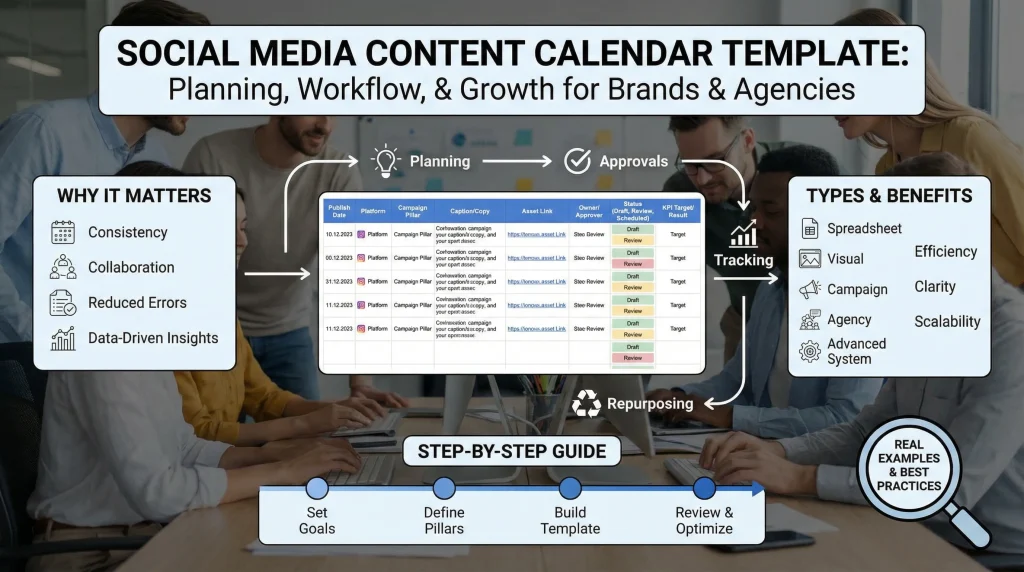
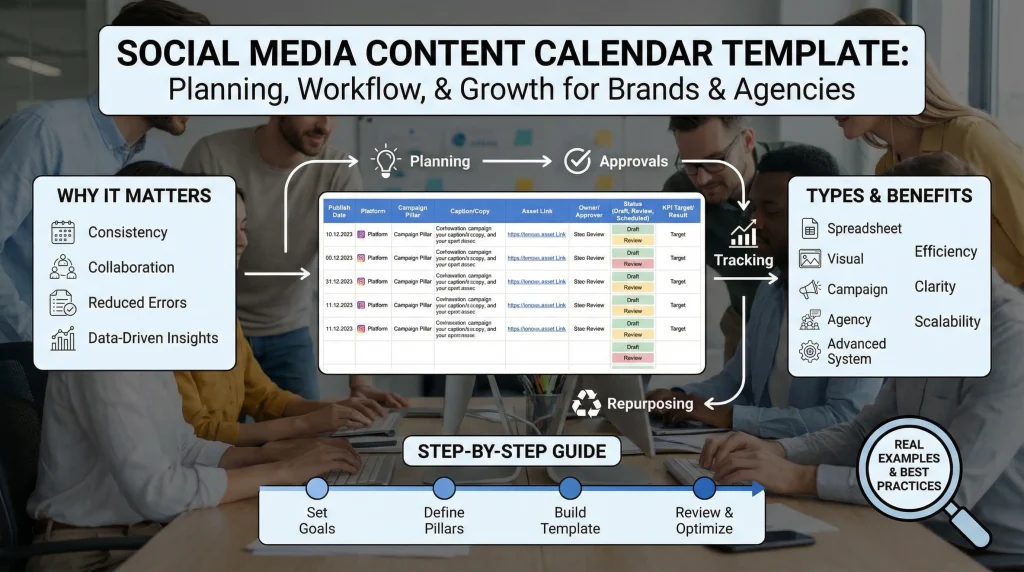
Social Media Content Calendar Template for Brands and Agencies
If you manage social media for brands or multiple clients, content planning can quickly become chaotic with scattered ideas, delayed approvals, and inconsistent posts. A social media content calendar template solves this chaos by centralizing post dates, captions, assets, owners, approvals, campaigns, and performance tracking into one organized system.
This guide is designed for both in-house brand teams and agencies. You will build a practical, scalable calendar that supports campaign alignment, smooth collaboration, KPI measurement, and flexible repurposing. Whether you want better consistency or stronger results, you can transform reactive posting into strategic, efficient content operations with this approach.
What Is a Social Media Content Calendar Template?
A social media content calendar template is a shared planning tool that lays out what you will post, when, where, and why. It also tracks who owns each task, approvals, and performance.
The most effective templates include these core elements:
- Publish date and time.
- Platform and format
- Campaign or content pillar
- Caption or copy
- Asset link
- Owner and approver
- Status (draft, review, approved, scheduled)
- CTA and destination URL
- UTM parameters
- KPI target and actual result
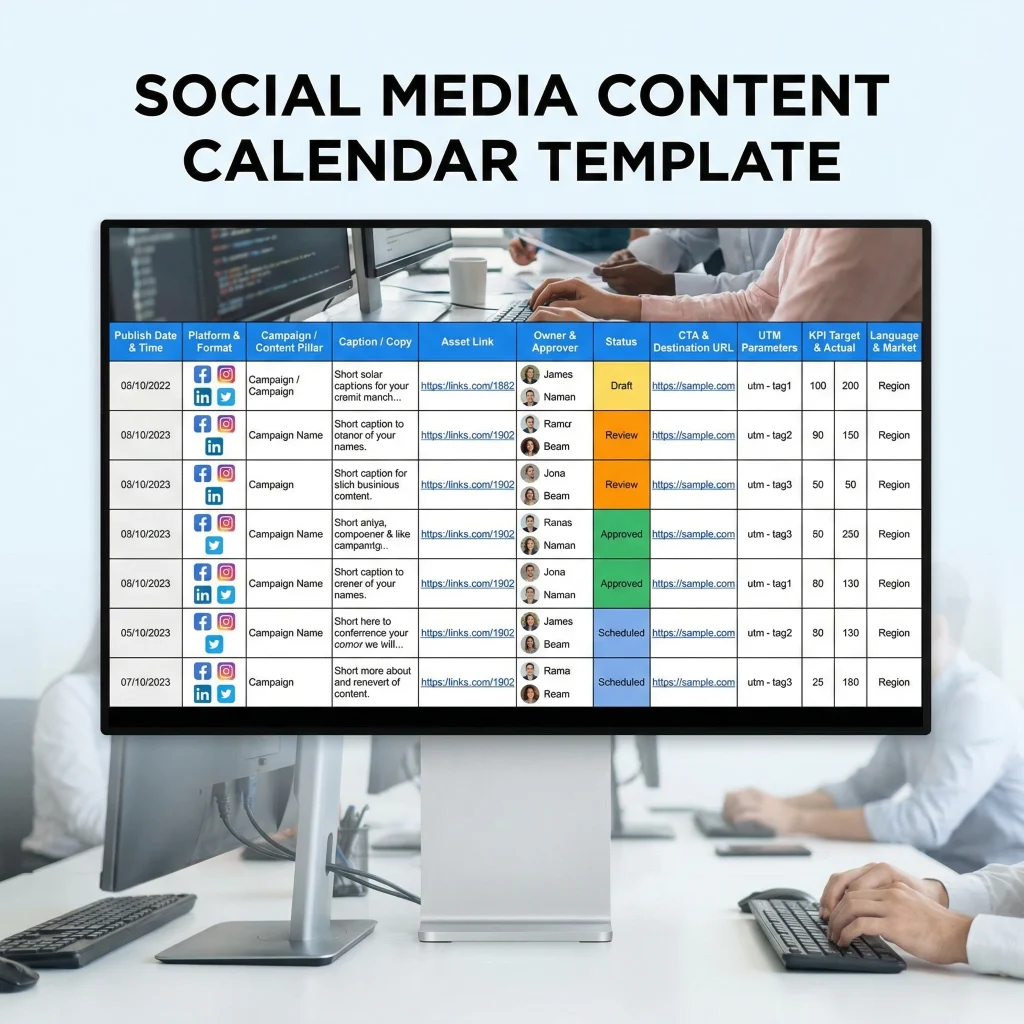
Teams working across regions should also add language and market columns.
What is a social media content calendar?
A social media calendar is a live document that organizes content creation and publishing. It supports execution across Instagram, LinkedIn, TikTok, and X.
To avoid confusion, here’s how related terms compare:
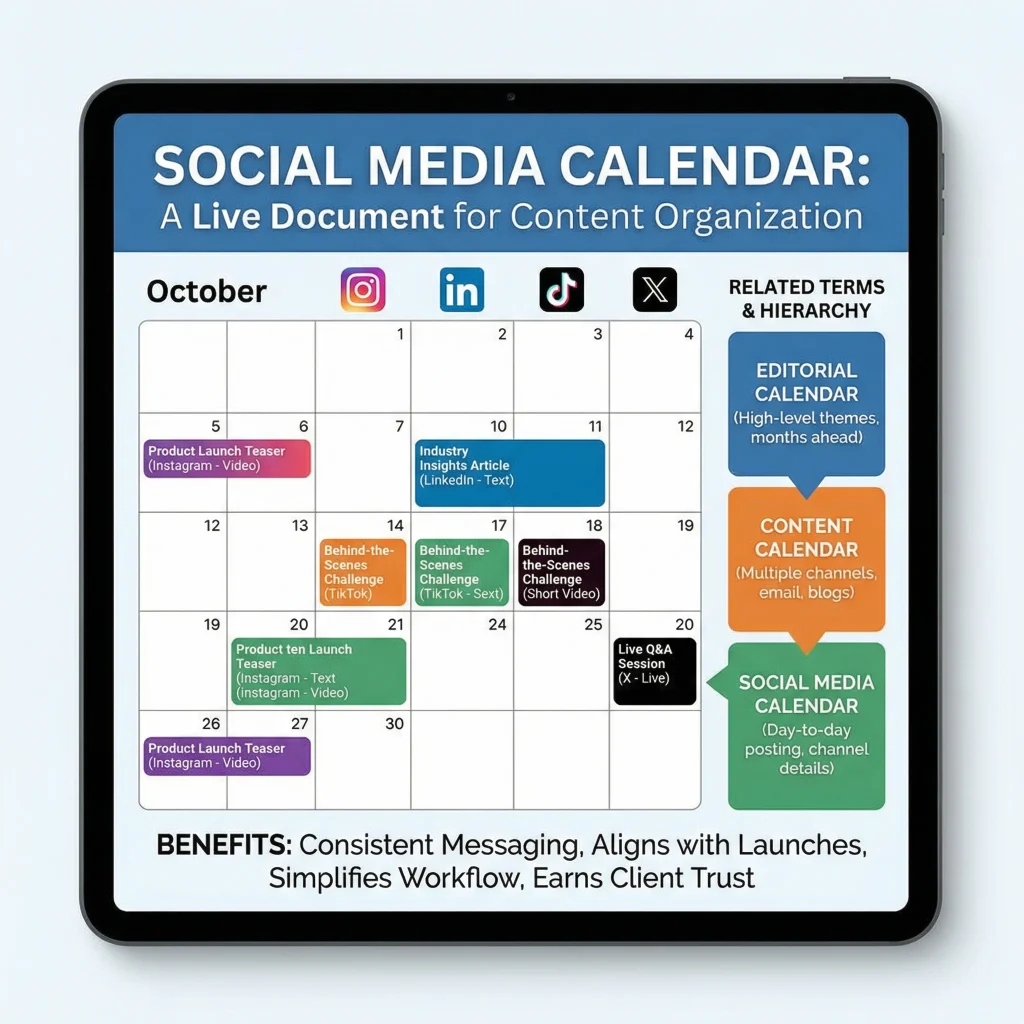
- A social media calendar focuses on day-to-day posting and channel-specific details.
- A content calendar often covers multiple channels, including email and blogs.
- An editorial calendar sits at a higher level, planning themes and campaigns months ahead.
A calendar provides brands with consistent messaging that aligns with product launches and marketing plans. For agencies, it simplifies workflow and earns client trust.
Why It Matters
Without structure, even creative teams lose consistency and scramble at the last minute. A solid calendar gives visibility and accountability.
Key reasons it matters:
- Maintains steady posting cadence instead of feast-or-famine patterns
- Aligns social efforts with larger marketing campaigns
- Makes collaboration smoother between writers, designers, and approvers
- Reduces errors like wrong links or outdated assets
- Turns data into actionable insights through built-in tracking
Agencies especially benefit from providing clients with clear timelines, approval status, and performance reports in one place. This setup highlights the value of using a calendar.
Types / Categories
Different teams need different levels of detail. Here are the main types:
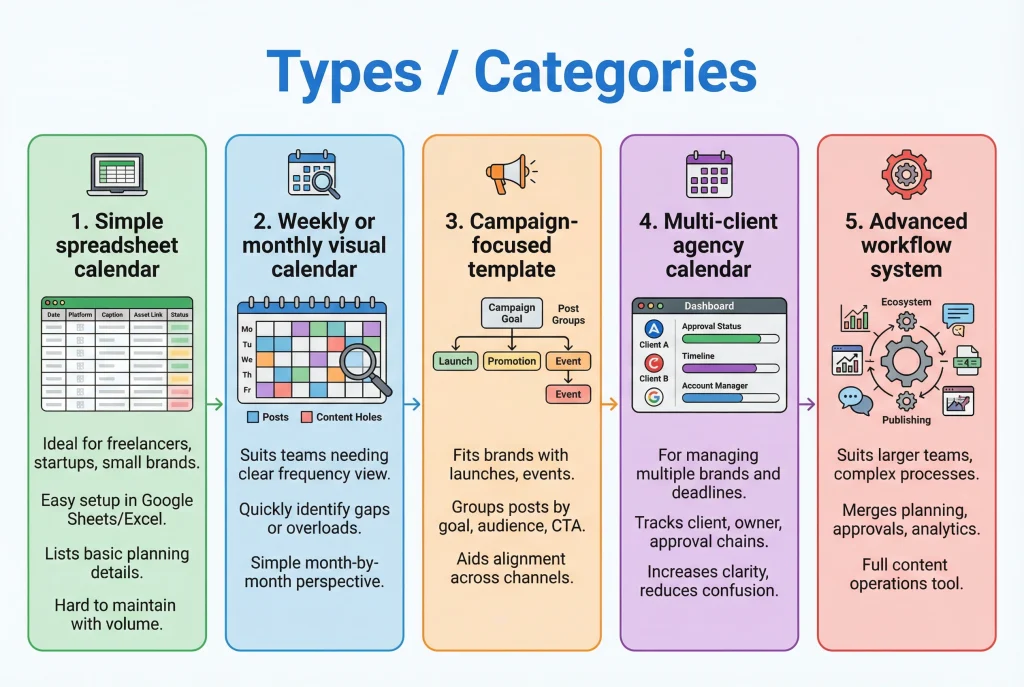
1. Simple spreadsheet calendar
This is ideal for freelancers, startups, and small brands. A spreadsheet calendar is easy to set up in Google Sheets or Excel and helps with basic planning. It usually lists publish dates, platforms, captions, asset links, and status updates. While simple to manage, it grows harder to maintain as content volume and stakeholder involvement rise.
2. Weekly or monthly visual calendar
A visual calendar suits teams needing a clear view of posting frequency and timing. It helps marketers quickly find content holes, overloaded days, or uneven platforms. Managers benefit from a simple month-by-month perspective without having to review detailed workflow data.
3. Campaign-focused template
This template fits brands with product launches, promotions, events, or seasonal campaigns. It groups posts by marketing goal, including campaign name, goals, target audience, CTA, and asset links, aiding alignment across channels.
4. Multi-client agency calendar
Agencies need a structured calendar for managing multiple brands, deadlines, and approval chains. This format tracks client, account manager, content owner, approval status, and timelines for each account. It increases clarity and reduces confusion between teams and clients.
5. Advanced workflow system
This suits larger teams or brands with complex review processes. It merges content planning, approvals, asset management, collaboration, scheduling, and analytics. Beyond posting, it performs as a full content operations tool supporting planning, publishing, and performance tracking.
Benefits social media content calendar
A good calendar brings quick relief and helps teams build long-term results, as the next sections will show.
Day-to-day wins
- Clear ownership reduces confusion.
- Earlier approvals prevent bottlenecks.
- Organized assets save hours of searching.
Strategic advantages
- Better topic balance through content pillars
- Easier performance analysis
- Stronger connection between social posts and business objectives
Agencies also benefit by making client reporting easier and scaling their work without confusion.
Risks or Limitations
No tool is perfect. Common pitfalls include:
- Overplanning that leaves no room for timely trends
- Creating a template so complex that nobody updates it
- Relying only on spreadsheets when the team size grows
- Forgetting to track results after publishing
Start simple and add features only as needed.
Best Practices
Focus on fields that drive action and measurement.
Here’s a proven structure:
| Publish date & time | Keeps timing accurate |
| Platform & format | Tailors content per channel |
| Brand/Client | Essential for agencies |
| Campaign | Links to bigger goals |
| Content pillar | Maintains topic variety |
| Caption/copy | Stores final text |
| Asset link | Prevents version mix-ups |
| Owner & approver | Creates accountability |
| Status | Shows progress at a glance |
| CTA + URL | Drives action and traffic |
| UTM parameters | Improves tracking accuracy |
| KPI target & result | Measures real performance |
| Language/Market | Supports global campaigns |
Use consistent status labels like “Idea → Draft → In Review → Approved → Scheduled → Published“.
Step-by-Step Guide
Building a practical social media content calendar template becomes much easier when you follow a clear process. Here’s a straightforward, step-by-step guide to help you create an effective system from start to finish.
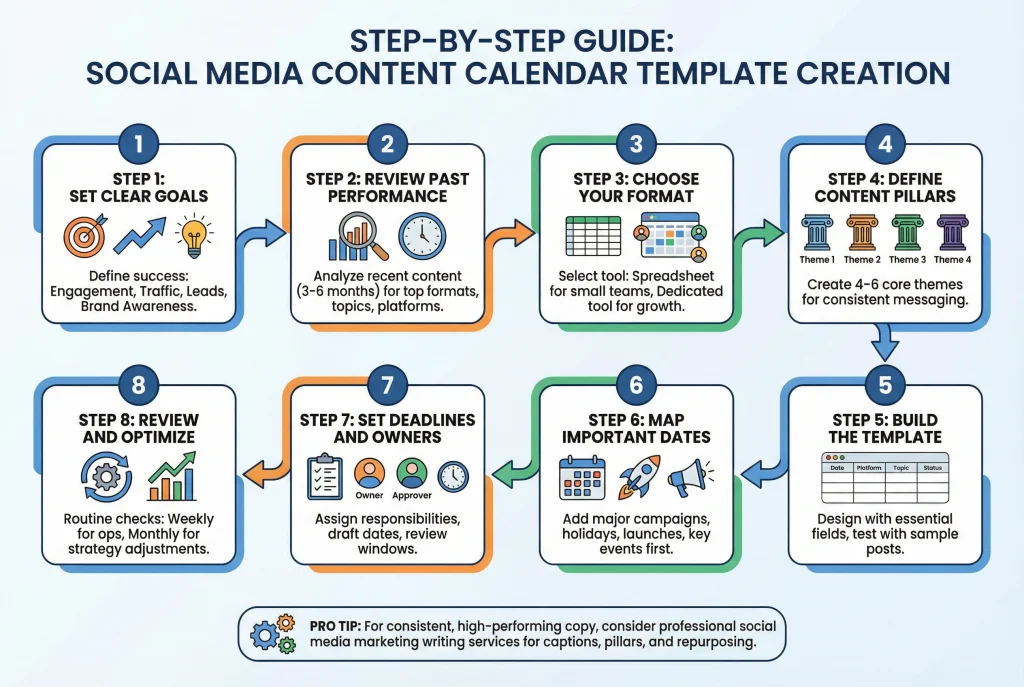
Step 1: Set clear goals
Start by defining what success looks like for your social media efforts. Decide on specific objectives such as increasing engagement, driving website traffic, generating leads, or building brand awareness.
Step 2: Review past performance
Next, analyze your recent content to understand what worked well and what fell short. Look back over the past three to six months to identify top-performing formats, topics, and platforms.
Step 3: Choose your format
Once you have clarity on your goals and performance, select the right format. Begin with a simple spreadsheet if your team is small, then switch to a dedicated tool as your collaboration and workflow needs grow.
Step 4: Define content pillars
After choosing your format, create 4–6 main content pillars. These core themes will keep your messaging consistent and aligned with your overall brand strategy.
Step 5: Build the template
With your pillars in place, design the actual template. Add the essential fields discussed earlier and test it by filling in a few sample posts.
Step 6: Map important dates
Now, populate the calendar by first adding major campaigns, holidays, product launches, and key events. This creates a strong foundation before filling in regular content.
Step 7: Set deadlines and owners
Then, assign clear responsibilities. Include draft due dates, review windows, and specific owners or approvers for each post to avoid last-minute delays.
Step 8: Review and optimize
Finally, make reviewing part of your routine. Check the calendar weekly for daily operations and monthly for performance analysis and strategy adjustments.
If your team struggles with consistent, high-performing copy, work with professional social media marketing blog writing services. They create compelling captions, pillar content, and repurposing frameworks that fit your calendar.
Practical Tips or Real Examples
In-house brand example
A fitness brand plans monthly campaigns around new product drops. Their calendar tracks format (Reels vs carousel), legal approval, and sign-up goals.
Agency example
A digital agency with 10 clients uses a single master view for workload and individual client calendars. This setup keeps internal deadlines visible and gives each client professional updates.
Small team example
A startup keeps it minimal with 12 columns and reviews every Monday morning. Simplicity keeps the system alive.
Conclusion
A social media content calendar template is the key to consistent, strategic, and measurable social media work. The main takeaway is that consolidating planning and approvals into a single calendar helps your team align every post with your primary goals, making both brands and agencies more successful online.
Start with the essential fields, keep your process practical, and check your results often. Think of calendars as active workflows, not just static lists, to achieve maximum efficiency and performance.
FAQs about social media content calendar
What is a social media content calendar template?
A social media content calendar template is a reusable planning tool that helps brands and agencies organize post dates, platforms, captions, assets, approvals, and performance tracking in one place. It turns chaotic content creation into a structured, repeatable process.
What should a social media content calendar include?
A strong social media calendar should include the publish date, time, platform, format, content pillar, caption, asset link, hashtags, destination URL, owner, and approval status. If you manage campaigns or clients, add KPI targets, review deadlines, and a link to the published post.
How far in advance should I plan social media content?
Most teams plan regular posts 2–4 weeks ahead. Major campaigns, product launches, and seasonal content are often mapped 2–3 months in advance. Always keep some buffer space for trending topics and reactive posts.
How often should I update my social media calendar?
Update your calendar continuously as posts move from idea to draft, to review, to scheduled, and to published. Most teams benefit from a weekly planning check for execution and a monthly review for performance, content gaps, and pillar balance.
Is Google Sheets enough for a social media content calendar?
Yes, Google Sheets works well for small teams, freelancers, and beginners. However, as your team grows or you manage multiple clients, dedicated tools with approval workflows, asset libraries, and analytics become more efficient.
How do agencies manage social media content calendars for multiple clients?
Most agencies use a master calendar for internal visibility and separate calendars for each client. This setup keeps the workload clear internally while providing clean, professional views for individual clients with their own approval flows and reporting.
How many content pillars should a brand have?
Most brands do well with 3 to 5 content pillars. That is usually enough to create variety without losing focus. Too few can make content repetitive, while too many can weaken consistency and make planning harder.
Should I schedule every post in advance?
No. A good calendar should create structure without removing flexibility. Many social media managers batch and schedule core content, then leave open slots for trends, timely updates, or reactive posts. That balance helps teams stay organized without sounding stale.
How often should I update or review my social media content calendar?
Update statuses daily or weekly as work progresses. Conduct a full operational review every week and a performance review every month to analyze results and adjust your strategy.
What is the best tool for a social media content calendar?
The best tool depends on your workflow. Google Sheets and Notion work well for smaller teams, while Airtable and dedicated social tools are better for richer views, approvals, scheduling, and analytics. The best choice is the one your team will actually maintain consistently.
What’s the difference between a social media calendar and an editorial calendar?
A social media calendar focuses on day-to-day execution across platforms (timing, formats, and publishing). An editorial calendar is broader and more strategic, covering content themes, campaigns, and publishing priorities across all marketing channels.
Can I repurpose blog content into my social media calendar?
Yes. Repurposing blog content is one of the easiest ways to keep a calendar full and consistent. A single long-form article can become multiple social posts, such as short tips, quote graphics, carousels, teaser videos, or thought-leadership captions mapped to different platforms and content pillars.

